A Smaller School?
Deliver a polished, branded event experience without a large team or a big budget.
A Smaller School?
Deliver a polished, branded event experience without a large team or a big budget.
Running Family Programs?
Give families everything they need, from schedules and maps to real-time updates, all in one place.
Running Family Programs?
Give families everything they need, from schedules and maps to real-time updates, all in one place.
Coordinating Move-In Day?
Share updates, manage events, and keep students informed from move-in through the academic year.

Coordinating Move-In Day?
Share updates, manage events, and keep students informed from move-in through the academic year.
Offering Campus Tours?
Deliver branded, self-guided tour experiences with interactive maps and rich media, available 24/7.

Offering Campus Tours?
Deliver branded, self-guided tour experiences with interactive maps and rich media, available 24/7.
Organising a Career Fair?
Simplify logistics for students, employers, and Career Services staff with one easy-to-use app.

Organising a Career Fair?
Simplify logistics for students, employers, and Career Services staff with one easy-to-use app.
Managing Alumni Events?
Plan reunions, regional events, and fundraising campaigns with an app built for alumni engagement.
Managing Alumni Events?
Plan reunions, regional events, and fundraising campaigns with an app built for alumni engagement.
Boost Student Engagement
One hub for schedules, resources, and events that keeps students connected throughout the academic year.
Boost Student Engagement
One hub for schedules, resources, and events that keeps students connected throughout the academic year.
Planning Orientation?
Help new students feel prepared from day one with schedules, campus resources, and real-time updates in one app.
Planning Orientation?
Help new students feel prepared from day one with schedules, campus resources, and real-time updates in one app.
Running Admissions Events?
Manage open houses, tours, and yield events with a branded app that saves time and engages prospective students.

Running Admissions Events?
Manage open houses, tours, and yield events with a branded app that saves time and engages prospective students.
5 Ready-to-Use Sponsorship Package Templates
Stop starting from scratch. Grab free templates that help you build professional sponsorship packages and close deals faster.

5 Ready-to-Use Sponsorship Package Templates
Stop starting from scratch. Grab free templates that help you build professional sponsorship packages and close deals faster.
Plan Your Next Event Without Missing a Beat.
From venue selection to post-event wrap-up, this free checklist walks you through every step (so nothing falls through the cracks).
.png)
Plan Your Next Event Without Missing a Beat.
From venue selection to post-event wrap-up, this free checklist walks you through every step (so nothing falls through the cracks).
Real Results From Real Events
100,000+ organizations trust Guidebook. See exactly how universities, associations, enterprises, and more put it to work.

Real Results From Real Events
100,000+ organizations trust Guidebook. See exactly how universities, associations, enterprises, and more put it to work.
Flexible pricing for every event size
Find the perfect plan for your needs, from intimate gatherings to large-scale conferences.

Flexible pricing for every event size
Find the perfect plan for your needs, from intimate gatherings to large-scale conferences.
Join our event experts
Watch on-demand webinars and join live sessions with industry leaders sharing best practices for event success.
.jpeg)
Join our event experts
Watch on-demand webinars and join live sessions with industry leaders sharing best practices for event success.
Guidebook in Action
Book a personalized walkthrough and discover how we help event teams create better attendee experiences.
Guidebook in Action
Book a personalized walkthrough and discover how we help event teams create better attendee experiences.


Campus Tours in the Age of Social Distancing - Your Questions Answered
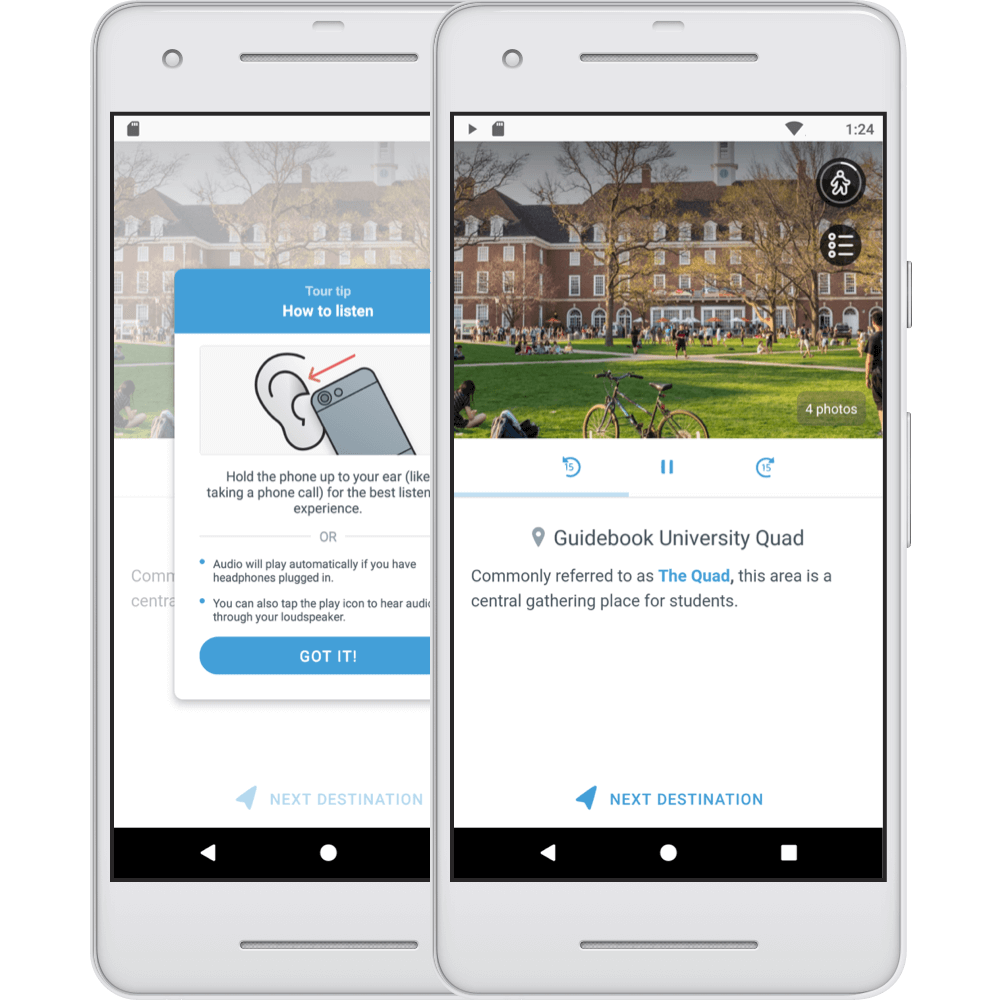
What are Self-Guided Tours?
Self-Guided Tours is our product dedicated to helping institutions showcase the campus experience through an interactive mobile tour. Self-Guided Tours are ideal for two scenarios:- For attendees who are physically present on campus and would like to maintain social distance and tour alone
- For attendees who aren’t on campus but would like to experience campus as if they were there
Tour Guide creation questions
What is a typical implementation timeline? We’ve seen universities get tours up and running in as fast as three days. Your implementation is dependent on preparing content (images, audio, text, and more) for your Guide. Is it possible to include multiple Tours in a Tour Guide? Yes, you can offer multiple tours within one Guide! Whether you’re looking to offer the same tour in multiple languages, provide a variety of tours for a single campus, or tours for multiple campuses, when you purchase a tours Guide, you can have multiple tours in a single Guide. Our team is happy to get your tours setup for you.Tour content questions
How many photos can be added to each tour stop? You can include ten photos per destination. You can include any photos you’d like, indoor and outdoor space at the location, showing the stop in different seasons, etc. Can we include videos in our tours as well? Yes. To include a video, you’ll want to add a link to the video in the tour stop description. When users click your video link, the chosen video will play within the tour stop page. In the description section of each tour stop, should there be more information beyond the audio script? That’s up to you! For example, if you’re including a video link, you probably wouldn’t mention the video in the audio clip. There may be other information like that that isn’t included in the audio. Including the information from the audio script in the description is important so everything is ADA compliant. Is there the option to add 'subtitles' or a transcript in addition to the bio for each stop? At the moment, there is not a specific location to add a transcript of the audio tour, but you can definitely use the description field to your benefit. Most schools use the description field as a place to share what is being said on the audio tour for accessibility purposes. For audio or video files is there a length/size limit? Yes, there is a size limit of 20mb per file. We’ve found this is plenty of space for a recording of a few minutes.Tour route questions
Are there limits to how many tour stops you have? You can add as many stops as you’d like! You’ll want to consider the length of the tour as you’re building out your tour. For small, private schools that are able to provide small tours at flexible times, how is Guidebook being used to supplement rather than replace or compete with those personal tours? The audio tour isn’t meant to compete with personal tours, personal tours are wonderful! Audio tours are a supplement to your admissions staff so in situations where potential students are either not able to be on campus, or a personal tour is not possible, the audio tour from Guidebook is a great option. We'd like to stagger tour starting points for families when we have more than one family on the tour at once (for social distancing). Is this possible? There are a couple of ways you can ensure social distance during tours. You can offer multiple tours so visitors are not all taking the same route. Additionally, with our updated tour functionality, anyone taking the tour can “skip to destination,” to skip a busy tour stop. They would need to navigate between stops using the skip to destination feature throughout. Is there the option to add 'subtitles' or a transcript in addition to the bio for each stop? At the moment, there is not a specific location to add a transcript of the audio tour, but you can definitely use the description field to your benefit. Most schools use the description field as a place to share what is being said on the audio tour for accessibility purposes.Virtual + In-Person questions
With guidance in the UK and Scotland discouraging in-person events as much as possible, is there a way to only have remote tours, so the option 'Yes I'm there' doesn't appear? There is currently not an option to remove the ‘Yes, I’m there’ option. However, as current events change, our product team is open to receiving feedback for future iterations! Is the "Tour Complete" page different for virtual and in-person? The tour complete page will be the same for virtual and in-person visitors. There is the flexibility to include two buttons at the conclusion of a tour, so if you have two different forms you’d like to send students to, you could use one button for virtual and one for in-person.Visitor questions
Is Guidebook and this feature available for download by international students when they are in their home countries? Yes, Guidebook and this feature is available internationally. It is dependent on country-specific Apple and Android app store availability (for example, China). Will prospective students who come to the campus and wants to use the Guidebook virtual tour need to download the Guidebook app? Yes, to use this feature, users will need to download the Guidebook app. Of course, we also offer Branded App options, so they could download a specific app to your university. Can the app save individual locations without being tied to a tour Yes, We have a Google Maps feature that can be added to the Guide separately and can provide locations that are not tied to a tour. Institutions use this feature to highlight points of interest like restaurants, stores, and other landmarks on campus and in neighboring towns. Do you have all indoor schools using Tours? My campus is all indoors with the exception of one building. I am wondering how an indoor campus using Guidebook differs from a tour being lead outdoors, mainly with the stops. Generally speaking, tours are built on top of Google Maps. This means, when adding stops to your tour, stops should be unique locations in Google Maps. Typically, we see Tours used to guide visitors along outdoor routes, but you have the flexibility to include indoor points of interest as well.Pricing
Is this tour feature included in the overall Guidebook system, or is it an add-on? The tours feature is a unique type of Guide on the Guidebook platform. We encourage you to talk to your Account Manager or reach out to sales@Guidebook.com to learn more. Interested in learning more about Self-Guided Tours? Get in touch to schedule a personalized demo today!
Plan with Confidence, Not stress
Get the complete event planning checklist with pre-event prep, day-of setup, and post-event follow-up all in one place..