

A Smaller School?
Deliver a polished, branded event experience without a large team or a big budget.

A Smaller School?
Deliver a polished, branded event experience without a large team or a big budget.
Running Family Programs?
Give families everything they need, from schedules and maps to real-time updates, all in one place.

Running Family Programs?
Give families everything they need, from schedules and maps to real-time updates, all in one place.
Coordinating Move-In Day?
Share updates, manage events, and keep students informed from move-in through the academic year.

Coordinating Move-In Day?
Share updates, manage events, and keep students informed from move-in through the academic year.
Offering Campus Tours?
Deliver branded, self-guided tour experiences with interactive maps and rich media, available 24/7.

Offering Campus Tours?
Deliver branded, self-guided tour experiences with interactive maps and rich media, available 24/7.
Organising a Career Fair?
Simplify logistics for students, employers, and Career Services staff with one easy-to-use app.

Organising a Career Fair?
Simplify logistics for students, employers, and Career Services staff with one easy-to-use app.
Managing Alumni Events?
Plan reunions, regional events, and fundraising campaigns with an app built for alumni engagement.

Managing Alumni Events?
Plan reunions, regional events, and fundraising campaigns with an app built for alumni engagement.
Boost Student Engagement
One hub for schedules, resources, and events that keeps students connected throughout the academic year.

Boost Student Engagement
One hub for schedules, resources, and events that keeps students connected throughout the academic year.
Planning Orientation?
Help new students feel prepared from day one with schedules, campus resources, and real-time updates in one app.

Planning Orientation?
Help new students feel prepared from day one with schedules, campus resources, and real-time updates in one app.
Running Admissions Events?
Manage open houses, tours, and yield events with a branded app that saves time and engages prospective students.

Running Admissions Events?
Manage open houses, tours, and yield events with a branded app that saves time and engages prospective students.
Get a custom Sponsorship Package Template
Stop starting from scratch. Grab free templates that helWe'll build a tailored sponsorship package with suggested pricing, tiers, and benefits..for your specific event.p you build professional sponsorship packages and close deals faster.
Get a custom Sponsorship Package Template
Stop starting from scratch. Grab free templates that helWe'll build a tailored sponsorship package with suggested pricing, tiers, and benefits..for your specific event.p you build professional sponsorship packages and close deals faster.
Plan Your Next Event Without Missing a Beat.
From venue selection to post-event wrap-up, this free checklist walks you through every step (so nothing falls through the cracks).
.avif)
Plan Your Next Event Without Missing a Beat.
From venue selection to post-event wrap-up, this free checklist walks you through every step (so nothing falls through the cracks).
Real Results From Real Events
100,000+ organizations trust Guidebook. See exactly how universities, associations, enterprises, and more put it to work.

Real Results From Real Events
100,000+ organizations trust Guidebook. See exactly how universities, associations, enterprises, and more put it to work.
Flexible pricing for every event size
Find the perfect plan for your needs, from intimate gatherings to large-scale conferences.

Flexible pricing for every event size
Find the perfect plan for your needs, from intimate gatherings to large-scale conferences.
Join our event experts
Watch on-demand webinars and join live sessions with industry leaders sharing best practices for event success.
.avif)
Join our event experts
Watch on-demand webinars and join live sessions with industry leaders sharing best practices for event success.
Guidebook in Action
Book a personalized walkthrough and discover how we help event teams create better attendee experiences.
Guidebook in Action
Book a personalized walkthrough and discover how we help event teams create better attendee experiences.
.avif)
How to Build a Mobile Campus Tour App (Step-by-Step)
Every year, millions of prospective students walk onto college campuses outside of scheduled tour times (on weekends, holidays, or random afternoons) and leave without a single meaningful interaction with your school.
No story.
No connection.
No follow-up.
A campus tour app solves that by putting a fully guided, branded tour experience directly on a student's phone, available whenever they show up (no staff required).
In this article you’ll learn how to:
- Gather the right content and student stories
- Map your route and set up tour stops
- Record professional-quality audio on a budget
- Add lead capture to turn visitors into applicants
- Market and launch your app in 4–6 weeks
Note: some of the insights in this guide are inspired from this Guidebook Greenroom episode on campus tours. Start there if you prefer a visual experience!
What is a campus tour app?
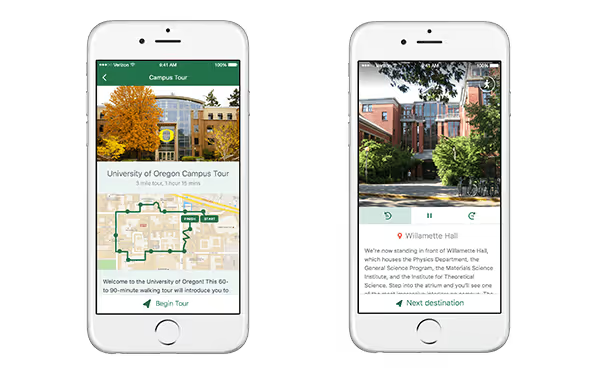
A campus tour app is a mobile application that guides prospective students through your campus using GPS navigation, audio narration, photos, and text—all without requiring staff to be present.
Think of it as a personal tour guide that lives in a student's pocket. As Guidebook's Group Product Manager, Gulnaar Kaur explains:
"Fundamentally with Guidebook tours, you follow a provided path using turn-by-turn navigation and at each tour stop you can listen to an audio recording from your tour guide, you can look at some pictures, and you can read some text provided to help you experience a place."
Unlike a printed map that offers static directions and sparse descriptions, a campus tour app delivers an immersive, multimedia experience. Students receive step-by-step wayfinding, hear authentic stories from current students, and engage with rich content at every stop.
Here's what makes a campus tour app different from other options:
Research suggests that about 80% of seniors eventually visit at least one college campus prior to attending college, and overall, many students do informal campus visits during the early stages of choosing a school. So, a campus tour app ensures the students who visit campus on their own time, still get a meaningful, branded experience.
And here's something most schools overlook: the same tour content can be experienced remotely.
As Gulnaar puts it:
"We want Guidebook tours to help build community whether folks are taking a tour on-site or remotely."
That means out-of-state and international students can explore your campus before they ever book a flight.
Self-guided tours vs. virtual tours: What's the difference?
If you've been researching campus tour technology, you've probably encountered both "self-guided mobile tours" and "virtual tours." They sound similar, but they serve very different purposes. So here’s a breakdown of both.
Self-guided mobile tours are designed for students who are physically on your campus. These tours use GPS to guide visitors from stop to stop, delivering audio and content when students arrive at each location.
By exploring campus on their own, prospective students can explore what matters most to them without feeling restricted by a preset schedule. This allows them to really get a feel for campus and its overall “vibe” (which will mean different things to different students).
Virtual tours (aka 360° tours) let prospective students explore a campus from anywhere in the world. Using panoramic video, animation, and layered graphics, they simulate the feeling of actually being on campus. Students navigate at their own pace, rotating their view in any direction to get a thorough look at buildings, outdoor spaces, and facilities.
Here's how they compare:
Now, if you’re thinking you have to choose one type of tour, you don't.
Many schools use virtual tours to help students narrow their list, then provide a self-guided mobile tour when those students arrive on campus.
Taking advantage of virtual tours early in the search process means students can focus their in-person visits on the schools that genuinely excite them (a smarter use of both their schedule and their budget).
If your primary challenge is engaging students who show up on campus outside of scheduled tour times (like weekends, holidays, or random Tuesday afternoons), then a self-guided mobile campus tour is your solution.
Who uses campus tour apps?
While admissions teams are the most common adopters of campus tour apps, the technology extends far beyond prospective student recruitment.
As Gulnaar notes: "I love to see people express their creativity and make great use of it across especially university campuses but also towns, cities, other places."
Here's how different departments put campus tour apps to work:
The common thread across all these use cases? Visitors get a consistent, high-quality experience whether staff are available or not. And every interaction becomes an opportunity to collect data and strengthen your connection with that audience.
Now that you understand what a campus tour app is, who uses it, and how it differs from virtual tours, let's get into the practical steps for building one.
How to create a mobile campus tour with Guidebook
1. Gather your content and student stories

A great campus tour begins with the student story. Students are what bring your campus to life, and their personal experience brings an authenticity that's hard to replicate any other way. Chances are you've already built a compelling narrative around your in-person tours; now it's time to translate that into a mobile app.
Work with your current tour guides to craft a narrative that plays well in recorded form.
Try to preserve some of the spontaneity of an in-person tour: the jokes, the asides, the small personal moments that make a tour feel real rather than scripted. Keep it welcoming, informative, and let the narrator's personality come through.
Also, don't be afraid to think outside the box. For example, what can you do with a recorded audio tour that you couldn't do in person?
Maybe the audio track could feature multiple students with different backgrounds and majors, input from professors, or even ambient sounds (a packed football stadium, or the orchestra warming up before rehearsal).
With Guidebook you can create multiple tours within one app, opening up territory you'd never cover in a single in-person tour: a track for athletes, Spanish-speakers, prospective engineering majors, transfer students, and so on.
2. Choose a route
With your story in place, it's time to choose a route. You may already have one in mind based on your current in-person tour.
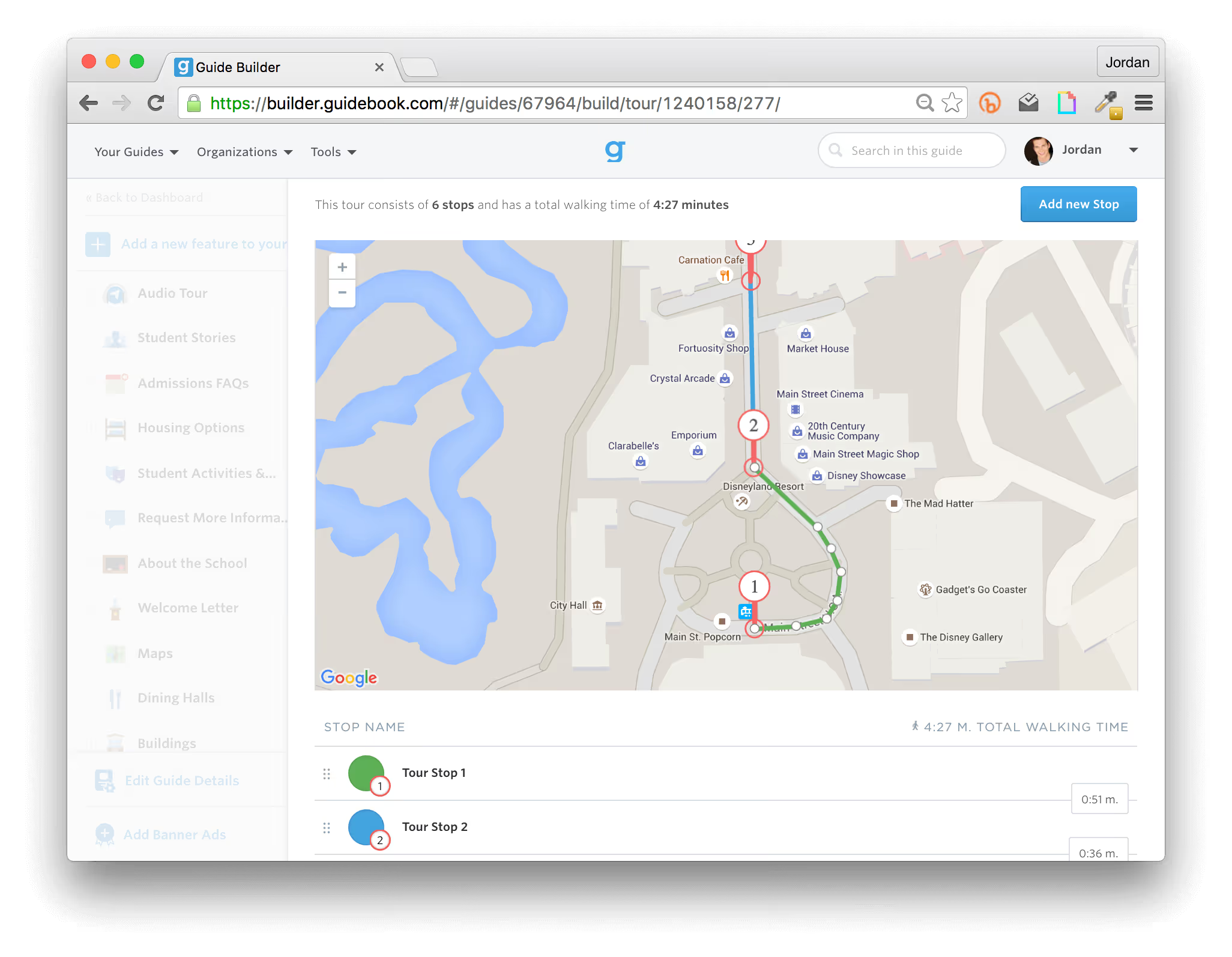
Adding stops to your app is straightforward. Once you've selected the Campus Tour template in Builder, click into the Audio Tour menu item and start placing stops on the map:
- Enter your campus address so the map centers on your university.
- Click "Add new stop" to place a pin on the map.
- An automated path appears connecting each new stop to the next.
- Drag the white dots to adjust the path shape if needed.
Each pin automatically triggers the audio narration and location content when a visitor arrives at that spot. Guidebook even estimates the total walking time based on your path's distance.
Best practice tip: Aim for 10–15 stops with a total walking time of 30–45 minutes — engaging without overwhelming. Stick to outdoor stops for the most reliable GPS performance.
3. Add photos and descriptions to each stop
Since visitors can already see the location in front of them, the best photos add something they can't: a different season, an interior space, a game day crowd, a late-night study session in the library.
Think of the photo as context, not just confirmation.
For descriptions, keep them concise and conversational; this is where you can add facts, history, or a student quote that the audio narration doesn't cover.
Together, the photo and description should make each stop feel like more than a pin on a map.
Accessibility tip: Consider adding a text transcript of your audio in the description field. It takes a few extra minutes per stop but makes your tour ADA compliant and accessible to all visitors. See this campus tour support guide for full technical specs.
Photo tip: Format images at 750px by 750px for the best display quality in the app.
4. Record your audio
You can record directly within Guidebook's Builder using your computer's microphone, but best practice is to upload your own MP3 file.
And don't worry: you don't need an expensive sound engineer or professional equipment. A quiet room with a decent microphone — even if it’s your phone’s built-in microphone — is enough.
Here are some tips to nail the recording:
- Use a free tool like Audacity to record and edit your audio (this is where Audacity really shines).
- Aim for 45–90 seconds per stop. This is long enough to be informative, and short enough to keep students’ attention.
- Record a test clip and listen back before recording all stops.
- If your narrator is a student tour guide, encourage them to speak casually, as if giving the tour to just one or two people.
- Record intros and outros separately so they're easy to re-record if anything changes.
- Save your files as MP3 at 128kbps or higher.
- One final trick: smile while you speak; you can't help but sound friendly that way.
5. Add a compelling call to action
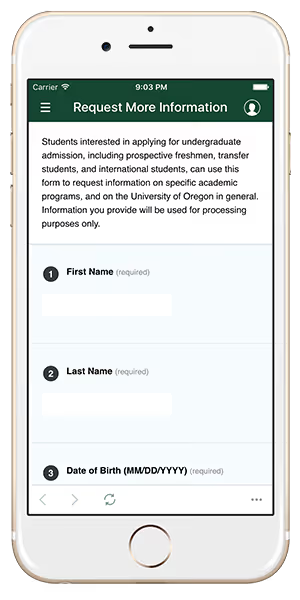
Your new campus tour app is not only offering a better experience to students taking a self-led tour, it’s also a better way for them to tell you that they’re interested in applying.
Each tour ends with a call to action that allows a student to submit a form to the email address(es) of your choosing. The questions on the survey are up to you and can include:
- Are they interested in applying?
- Did they enjoy the tour?
- Was there something missing from the experience?
- Would they recommend it to a friend?
- Are they more likely to apply after taking the tour than they were before?
This is your opportunity to collect data that helps you fine-tune and improve future tours, as well as your overall recruitment strategy.
What results can you expect from a campus tour app?
With your tour built and your call to action in place, you might be wondering: does this actually work? Here’s an example from Indiana Tech:
Their admissions team replaced traditional printed packets with a campus app, resulting in:
- 375 hours saved
- 29% cost reduction
- 105% increase in student yield (from 40% to 82%)
Why such dramatic results?
A campus tour app captures "unofficial" visitors who would otherwise leave your campus without any way for you to follow up. Every student who completes your self-guided tour becomes a lead in your recruitment pipeline.
Beyond lead capture, you gain insights that would be impossible to obtain with paper maps, such as:
- Which stops are most engaging (and which get skipped)
- When students visit (weekends? evenings? holidays?)
- What questions they have after completing the tour
- Whether they'd recommend the experience to friends
Marketing your campus tour app
Building a self-guided campus tour app is the easy part. Getting people to know it exists takes a little more intention.
The good news is, this doesn’t have to be hard or overwhelming. Here are a few high-impact promotional tactics that actually move the needle:
- Include a link to your campus tour app in confirmation emails when students register for a tour. If they miss the tour time, they’ll still have the option to use your app.
- Email tour no-shows with a link to your tour app.
- If you have an open campus, place signs or markers in strategic locations around your campus. People who have casually stopped by will be able to download it on the spot!
- Place a link to your campus tour app in a prominent place on your Admissions website.
- Run ads for your campus tour app on the digital displays in buildings where visitors are most likely to go - the Student Union or Library, for example.
- Place QR codes on physical signage at campus entrances, parking lots, and visitor centers. Casual visitors can download the app on the spot and start their self-guided tour immediately.
How long does it take to launch a campus tour app?
With your marketing plan ready, you're probably wondering about the timeline. The good news: this isn't a semester-long project.
Most schools launch their campus tour app in weeks, not months. Here's a realistic breakdown:
- Week 1-2: Gather content (photos, route planning, student stories)
- Week 2-3: Record audio narration and refine scripts
- Week 3-4: Build the tour in Guidebook's no-code builder
- Week 4-5: Test with staff and student ambassadors, make refinements
- Week 5-6: Launch and begin marketing
The timeline depends largely on how much content you already have. If your current tour guides already have polished scripts and you have a library of campus photos, you could launch even faster.
And once you're live, updates are easy. New building on campus? Add a stop. Seasonal changes? Swap out photos. Outdated information? Edit the text in minutes. Unlike printed materials that require reprints, your campus tour app stays current with minimal effort.
Why choose Guidebook for your campus tour app?
You have options when it comes to campus tour technology. So what makes Guidebook different?
Guidebook's tours feature launched in late 2015, which means it's gone through more than a decade of refinement based on real feedback from higher ed professionals. That kind of development history translates to a mature, reliable product built specifically for the challenges admissions teams face.
The combination of GPS-powered navigation, audio playback, and native app performance sets Guidebook apart from web-based alternatives that struggle with connectivity issues on sprawling campuses.
Here's what matters most to the 1,000+ higher ed planners who trust Guidebook:
- No-code builder: Your team can create and update tours without IT involvement
- Native app experience: Reliable performance even in low-connectivity areas
- Full customization: Your colors, branding, and messaging throughout
- Multiple tour tracks: Create specialized experiences for different audiences
- Built-in lead capture: Collect student information directly from the app
- Ongoing support: A team that understands higher ed, not just software
Whether you're building a straightforward admissions tour or experimenting with specialized tracks for athletes, transfer students, or specific academic programs, Guidebook gives you the flexibility to express your campus's unique story.
What does it cost? Plans start from $3,750 for a single event app, with options scaling up for branded apps and teams running multiple events year-round.
The ROI tends to speak for itself, with institutions like Indiana Tech stating that their Guidebook-powered app costs 29% less than printing (that’s on top of the 105% increase in student yield the app helped them achieve).
See current plans on the Guidebook pricing page, or explore this event app pricing guide if you want to understand the broader market first.
If you'd like to see more for yourself, start building your campus tour app now or request a demo from one of our higher ed experts.
Frequently asked questions about campus tour apps
[faq]
Q: What is a campus tour app?
A: A campus tour app is a mobile application that guides prospective students through your campus using GPS navigation, audio narration, photos, and text. It's available 24/7 without requiring staff, giving visitors a self-paced, immersive tour experience on their own schedule.
Q: What's the difference between a self-guided campus tour app and a virtual tour?
A: A self-guided mobile tour uses GPS to guide students who are physically on campus, triggering audio and content at each stop. A virtual (360°) tour lets students explore remotely from anywhere via panoramic video. Many schools use both: virtual tours for early research, mobile tours for in-person visits. Guidebook supports self-guided mobile tours, with the option to use the same content for remote viewing.
Q: Who is the target audience for a mobile campus tour?
A: The primary audience is prospective students and families who visit on weekends, holidays, or outside of scheduled tour times. However, campus tour apps also serve orientation attendees, alumni returning for reunions, parents during family weekends, and anyone exploring campus independently.
Q: Why go mobile instead of using printed maps?
A: Many prospective students prefer to explore campus on their own, especially during the early stages of their search. Mobile apps provide GPS directions so visitors don't get lost, collect data so you can follow up with interested students, and stay current without reprinting. A paper map can't tell you who visited or whether they're planning to apply.
Q: Can I customize the tour to match my school's brand?
A: Yes. With Guidebook you can fully customize your app with your school's colors, branding, and messaging throughout, without ever writing a line of code.
Q: How does GPS navigation work within the app?
A: Students follow a designated path with turn-by-turn directions displayed on their phone. When they arrive at each stop, the app automatically triggers the audio narration and displays photos and text for that location. The experience feels like having a personal tour guide without the scheduling constraints.
Q: How do we capture leads from self-guided tour visitors?
A: An end-of-tour form can collect student information (such as name, email, intended major, application plans) and send it directly to your admissions team. You can customize the questions to match your recruitment strategy and follow up with every visitor who completes the tour.
Q: How long does it take to set up a campus tour app?
A: You can launch in 4-6 weeks. The timeline depends on how much content you already have prepared. With a platform like Guidebook you have access to templates, which accelerates app-building because you don’t have to start from scratch.
Q: How much does a campus tour app cost?
A: With Guidebook, plans start from $3,750 for a single event app, with options for branded apps and multi-event teams. Many schools find the investment pays for itself quickly. For example, Indiana Tech's app cost 29% less than printing, and yield jumped from 40% to 82%. See full plan details on the Guidebook pricing page, or explore this event app pricing guide for a broader market comparison.
A: Yes, the same tour content can be experienced from anywhere. This helps out-of-state or international students explore your campus before visiting in person. They won't get the GPS navigation, but they'll hear the audio, see the photos, and engage with your campus story from wherever they are.
[/faq]
Plan with Confidence, Not stress
Get the complete event planning checklist with pre-event prep, day-of setup, and post-event follow-up all in one place..


